Building deployment automation piece by piece
#github-actions#cicd#devops#continuous-deployment#automation#platform#slack
Tl;dr
- Overview - I built the same CD pipeline for three different projects this year, and deploys went from 1-2 a month to as many as 5 a day.
- The shape that stuck - One orchestrator workflow: lock, build, staging, two approvals, production, sandbox, release the lock, with CI running alongside.
- Piece 1: The deployment lock - A lock file in S3, acquired with a conditional write in the merge queue, so only one deploy runs at a time.
- Piece 2: CI inside CD - The pipeline reruns CI in parallel with the staging deploy as a safety net before production.
- Piece 3: Build once, deploy many - An optional build ID input skips the build so you can redeploy a known artifact.
- Piece 4: Two approval gates - Two GitHub Environments, one for the author to validate staging and one for someone else to approve production.
- Piece 5: Production - Production and sandbox deploy in order, with
!cancelled()guards so optional jobs can't silently skip steps. - Piece 6: Release notes - GitHub's generated release notes, fetched once at the top of the pipeline and reused in Slack and the GitHub Release.
- Piece 7: Slack messaging - The hardest part every time: mapping GitHub users to Slack, seeing through the merge queue bot, and routing failures.
- Piece 8: Shared actions - The second build is when I pulled shared pieces into one actions repo, and the third taught me to pin them to a SHA.
- What the third build taught me - With two working pipelines to diff against, the third was about a week of focused work shipped as small PRs.
- Rollout - Dispatch-only first, test runs with the team, and flipping the push-to-main trigger last.
- Conclusion - The shape settled after the first build, and the lock and the messaging are what got people to trust it.
Overview
So, I've now built the same continuous deployment pipeline three times this year, for three projects that don't have much in common.
The first was a newer backend API that runs as a containerized service. The second was a frontend repo, which is a mix of static sites and SSR sites hosted on AWS S3 & Amplify. The third was a legacy monolith hosted on ElasticBeanstalk & EC2.
All three started in roughly the same spot. Deploys were done by hand, mostly from tribal knowledge, and there wasn't really an audit trail of what went out when. Across these apps we've gone from about 1-2 deploys a month to somewhere between 1 and 5 a day.
One rule I stuck to all three times was manual first via GitHub workflows, then automated. Every step had to work from a manual trigger before anything was allowed to fire on a push to main.
In this post I'll walk through the pipeline piece by piece, and what changed in each piece as I rebuilt it. This is all how things look as of October 2026.
The shape that stuck
Each pipeline ended up as a single orchestrator workflow that runs these steps (mostly) in order:
- Validate the deployment lock is held
- Run CI, in parallel with the build and the staging deploy
- Build, unless a build ID was passed in
- Deploy to staging
- Wait for the PR author to validate staging
- Wait for someone other than the author to approve production
- Deploy to production, once CI has passed
- Deploy to the sandbox environment
- Release the lock
Slack messages go out along the way.
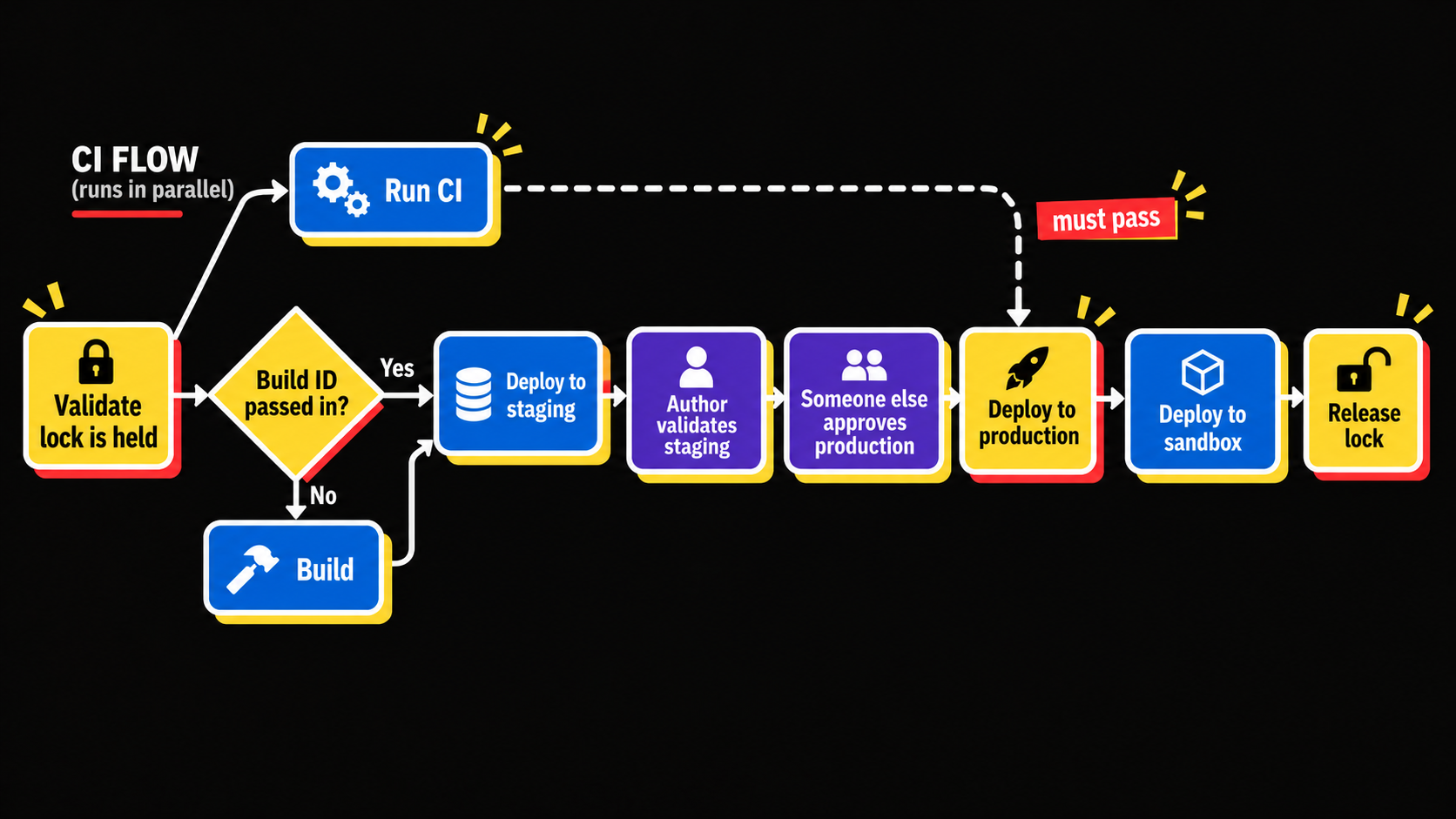
I got to this shape on the first build mostly by trial and error. The second build copied it pretty closely, and the third had to bend it around tooling that already existed. The overall shape barely moved after that first build.
Piece 1: The deployment lock
First problem: two merges racing each other into a deploy. If two PRs land close together you get two pipelines trying to deploy at the same time. Not great.
My fix is a lock (a mutex) stored in an S3 bucket, wrapped in an action that can acquire, validate, and release it.
The lock itself is just a small JSON file in S3. Acquiring it is a single conditional write:
aws s3api put-object \
  --bucket "$LOCK_BUCKET" \
  --key "${PROJECT}.lock" \
  --body lock.json \
  --if-none-match "*"
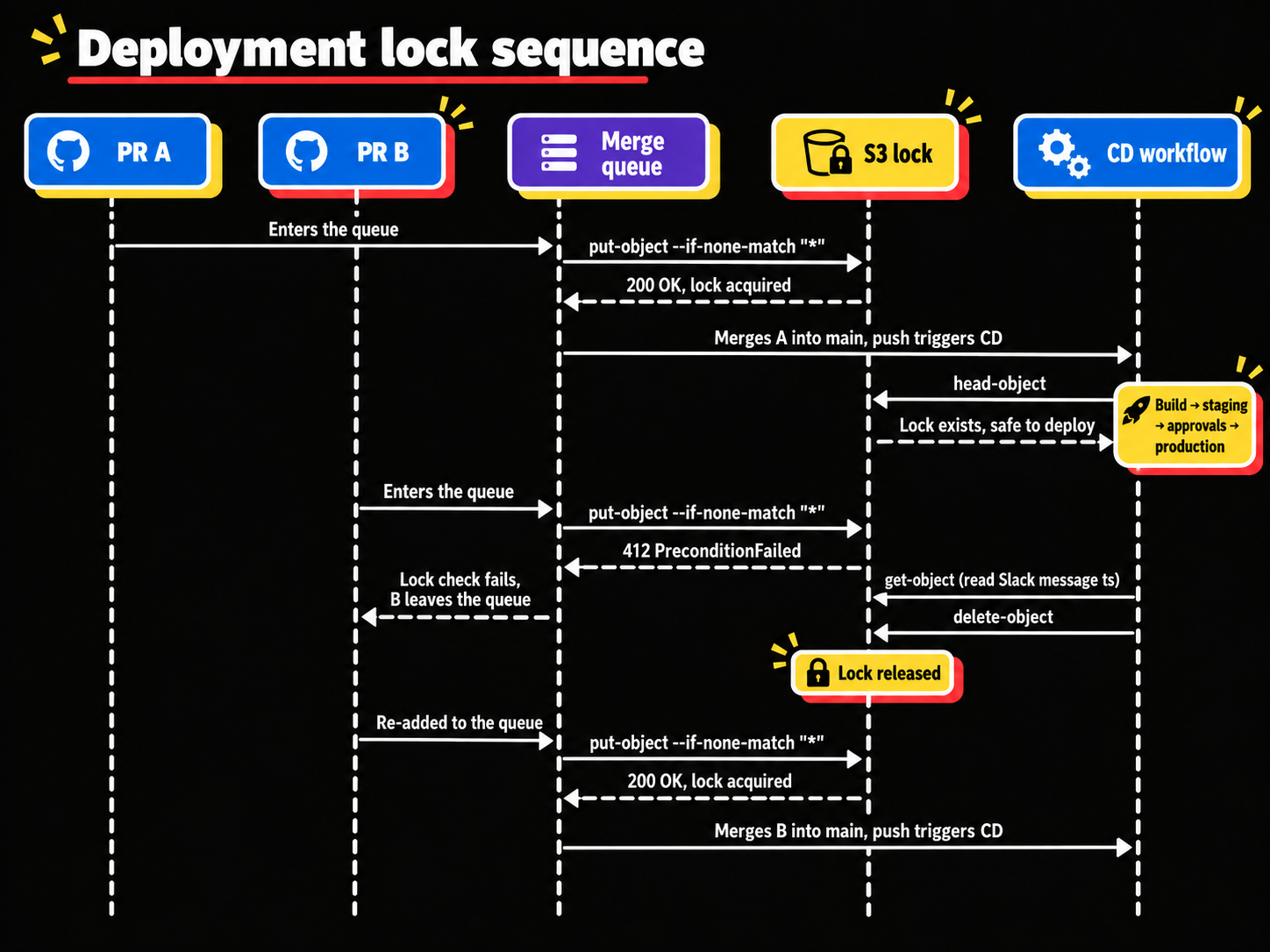
--if-none-match "*" tells S3 to only write the object if it doesn't already exist (S3 calls these conditional writes). If someone else holds the lock, S3 rejects the write with a 412 PreconditionFailed and the step fails. So the check and the acquire happen in one atomic call, and there's no race between them. Checking the lock is a head-object (does the file exist?), and releasing it is a delete-object. That's pretty much the whole mutex.
The lock check is a required check in the merge queue. If the lock is held, the check fails and the PR can't merge at all. If it's free, the check acquires it, and the merge queue succeeds merging the PR to main. Then the CD workflow on main validates that it still holds the lock, and releases it at the very end. So while a deploy is in flight, nothing else merges.
Here's what that looks like with two PRs trying to go out at the same time:
In the CD workflow that looks like this:
jobs:
  check-lock:
    uses: ./.github/workflows/cd-lock.yml
    secrets: inherit
    with:
      check: true
      check-expect: locked
      # A manual run has no merge queue in front of it, so it takes the lock itself
      acquire: ${{ github.event_name == 'workflow_dispatch' }}

  # ... build, stage, deploy ...

  release-lock:
    needs: [check-lock, deploy]
    # always() so the lock gets released on failed or cancelled runs too,
    # but only if this run actually held it
    if: always() && needs.check-lock.result == 'success'
    uses: ./.github/workflows/cd-lock.yml
    secrets: inherit
    with:
      release: true
The always() on the release is important. Without it a failed deploy would leave the lock held, and nobody could merge until someone cleaned it up by hand. Depending on what you're trying to do, you may want that. I find it easier to fix something that's broken with a small team if the lock is released and you're free to merge a fix.
It didn't start out that way. On the first build I checked the lock as a regular PR check, and the problem was it went stale. If the lock happened to be held when the check ran, the check failed and just stayed failed, since nothing re-ran it when the lock was released.
One gotcha with that. The lock check has to be a required check so the merge queue actually relies on it. But that means it also has to report something on regular PRs. So the lock job just skips when the trigger is a pull request:
on:
  pull_request:
  merge_group:
    types: [checks_requested]
  workflow_call:
    # check / acquire / release inputs for the CD workflow

jobs:
  cd-lock:
    runs-on: ubuntu-latest
    # Required check, so it has to run on PRs, but there's nothing to lock yet.
    # A skipped job reports as successful, so the PR isn't blocked.
    if: ${{ github.event_name != 'pull_request' }}
I also added some metrics around the lock on that first build. Then after some feedback from the team I added Slack messages whenever the lock is acquired or released. People needed the state of the pipeline spelled out clearly, and that turned out to be key. If folks can't see the lock, they don't know what's going on.
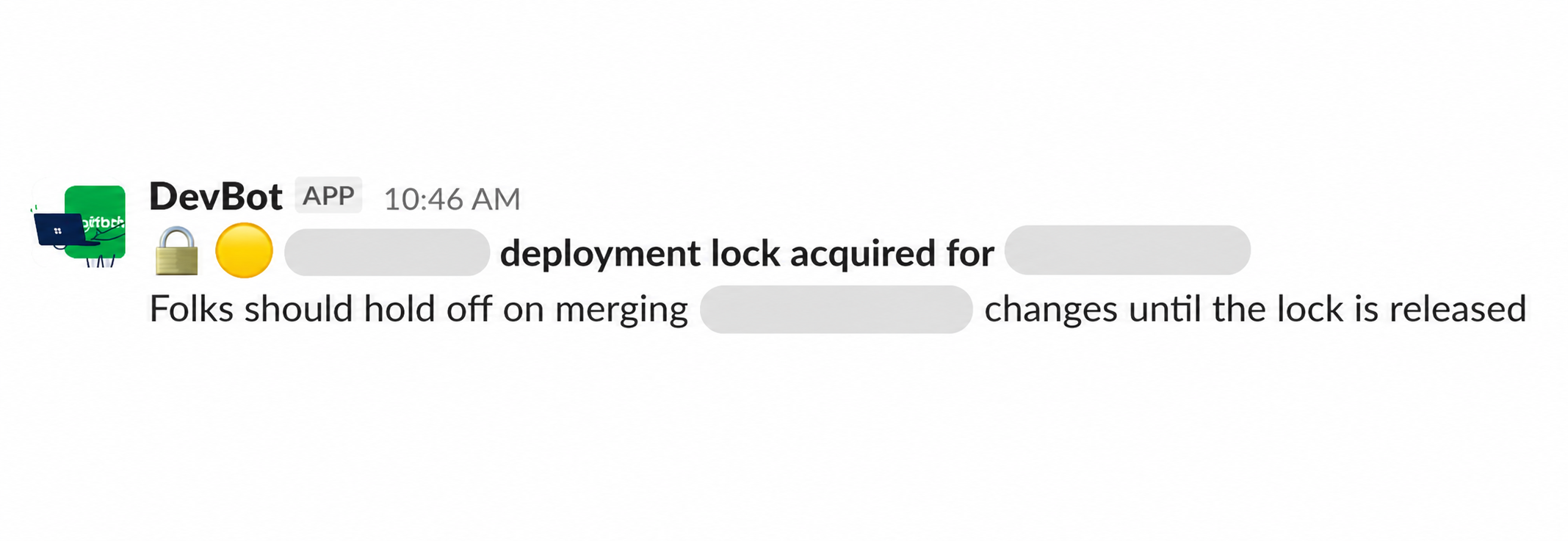
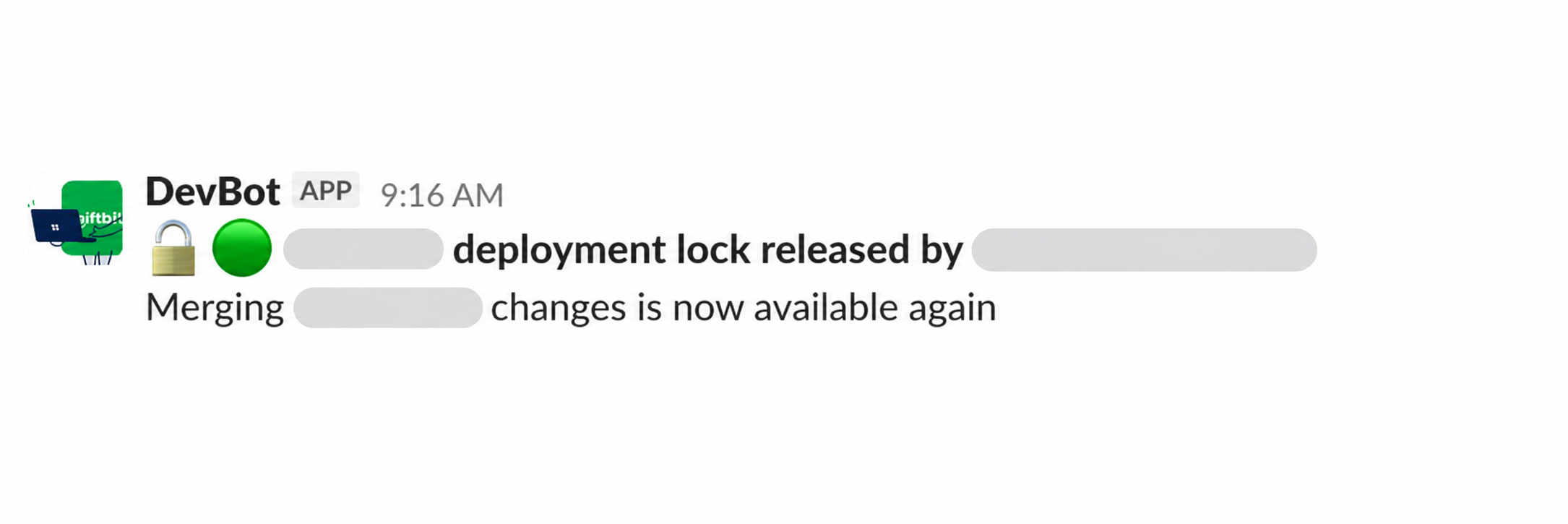
One small trick I like here. When the lock is acquired I post a "lock acquired, hold off on merging" message, and save that message's Slack timestamp into the lock file's JSON body. When CD releases the lock it reads the file first, so it knows exactly which Slack message to delete before posting the "lock released" one. So the lock file carries its own cleanup info, which I thought was kinda neat.
The second build ported the merge queue lock workflow as is, with its own bucket. That's also when I pulled the lock action out into a shared actions repo. Then during the third build I refactored all three projects onto a single central bucket, with each lock object keyed off the repository name.
Piece 2: CI inside CD
The pipeline runs the test suite itself instead of trusting the CI that ran on the branch. I'll be honest, this one is a "just in case". The merge queue and branch CI should catch everything. I just didn't want the deploy pipeline assuming that.
CI runs in parallel with the staging deploy, and if it fails it blocks the production deploy. Since CI already passed before the merge it's really just a safety net on top.
  ci-tests:
    uses: ./.github/workflows/tests.yml

  stage:
    needs: [check-lock]
    uses: ./.github/workflows/deploy.yml
    with:
      environment: staging

  deploy:
    # CI doesn't hold up staging, but production waits on it
    needs: [ci-tests, stage-validate]
    uses: ./.github/workflows/deploy.yml
    with:
      environment: production
You can see stage doesn't depend on ci-tests at all, so staging goes out right away. deploy needs both, so production won't start until CI has passed and staging has been validated.
The monolith made this a bit more work. It has a big test suite split up across modules (unit and integration tests for each backend module, frontend tests, plus lint and build checks). So the CI inside CD had to be rebuilt to match its list of required checks.
Piece 3: Build once, deploy many
The pipeline got an optional build ID input. Pass one in and the build step gets skipped, and the pipeline deploys that build instead. That way you can redeploy a known artifact without rebuilding it.
And so the whole CD workflow also gets a workflow_call trigger. So you can manually invoke it from the GitHub UI with an existing build ID.
The build workflow has two jobs, and only one of them runs:
on:
  workflow_call:
    inputs:
      existing-build-id:
        type: string
        required: false
    outputs:
      build-id:
        value: ${{ jobs.build.outputs.build-id || jobs.existing-build.outputs.build-id }}

jobs:
  existing-build:
    if: ${{ inputs.existing-build-id }}
    runs-on: ubuntu-latest
    outputs:
      build-id: ${{ steps.build-id.outputs.build-id }}
    steps:
      # Look up the existing image here to make sure it's real, then pass the ID through
      - id: build-id
        env:
          BUILD_ID: ${{ inputs.existing-build-id }}
        run: echo "build-id=$BUILD_ID" >> "$GITHUB_OUTPUT"

  build:
    if: ${{ !inputs.existing-build-id }}
    runs-on: ubuntu-latest
    # ... the normal build ...
The || in the workflow output is the bit that makes this work. Whichever job ran, the caller gets a single build-id output and doesn't need to care where it came from.
Piece 4: Two approval gates
This is one of the more interesting parts of the pipeline, and it was one of the trickier bits to solve. It's been core to the pipeline since the first build.
The pipeline needs to pause after the staging deploy and wait for the PR author. Some of our validation is still manual, so the author checks that their change is correct in staging. When they're done they approve a GitHub Environment called staging-validate. This approval just lets the pipeline move on to production, which blocks on a second approval.
The production approval has to come from someone else, explicitly not the PR author. It's simply a second person agreeing the change can go to production.
I gave myself two constraints here. I only wanted to use GitHub Actions approvals, no external approval system. And I wanted one gate that blocks on the author, and one that blocks on anyone but the author.
Both gates are GitHub Environments with required reviewers. So how do you get a gate only the author approves? Technically you don't. Anyone can approve the staging gate. What makes it the author's gate is the Slack messaging. The workflow DMs the PR author asking them to validate and approve the staging deploy, and nobody else gets that message.
So the "author only" part is really enforced by who gets told about it. It's good enough in practice, and it kept everything inside GitHub and Slack. Basically it's two environments acting as a lightweight two-person rule.
The gate job itself is tiny. It doesn't do anything except reference the environment:
  # This job & environment simply act as a gate. It blocks until
  # someone approves the staging-validate environment.
  stage-validate:
    needs: [stage]
    runs-on: ubuntu-latest
    environment: staging-validate
    steps:
      - run: echo "🟢 If this ran then staging validation is complete."
When the pipeline reaches that job, the run pauses and GitHub shows a review button. Approving it is just a checkbox and a click:
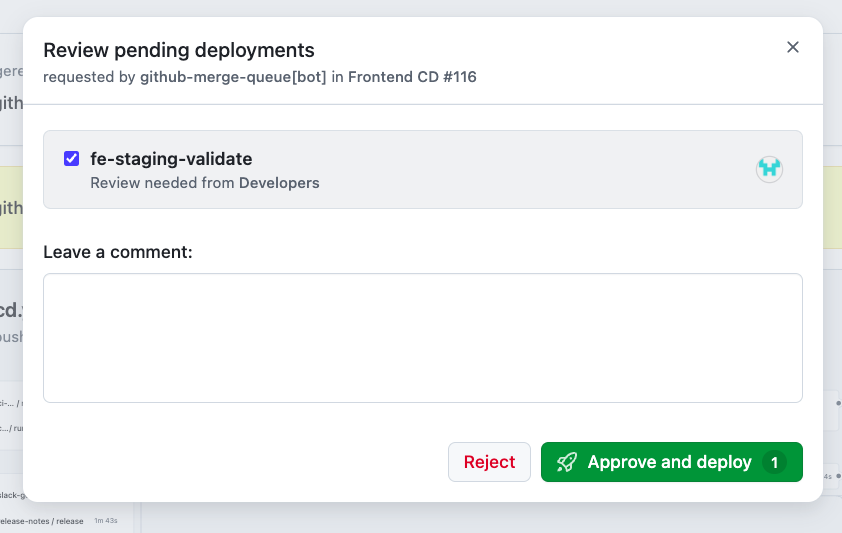
All the real work is in the environment settings (required reviewers) and the DM that goes out next to it:
  stage-validate-messaging:
    needs: [slack-get-ids, stage]
    runs-on: ubuntu-latest
    outputs:
      ts: ${{ steps.dm.outputs.ts }}
      channel: ${{ steps.dm.outputs.channel_id }}
    steps:
      - id: dm
        uses: slackapi/slack-github-action@<commit-sha> # v4.0.0
        continue-on-error: true # Slack trouble shouldn't fail a deploy
        with:
          method: chat.postMessage
          token: ${{ secrets.SLACK_BOT_TOKEN }}
          payload: |
            channel: ${{ needs.slack-get-ids.outputs.user-id }}
            text: "🧪 Your staging deployment is ready to be validated. When you're done: <https://github.com/${{ github.repository }}/actions/runs/${{ github.run_id }}|Sign-off on staging>"
This uses Slack's GitHub Action to call chat.postMessage. Posting to a Slack user ID as the channel sends it as a DM from the bot. The job saves the message's ts and channel as outputs, so a later job can chat.delete the DM once the gate has been approved. That way the author isn't left with a stale "please validate" message sitting in their DMs.
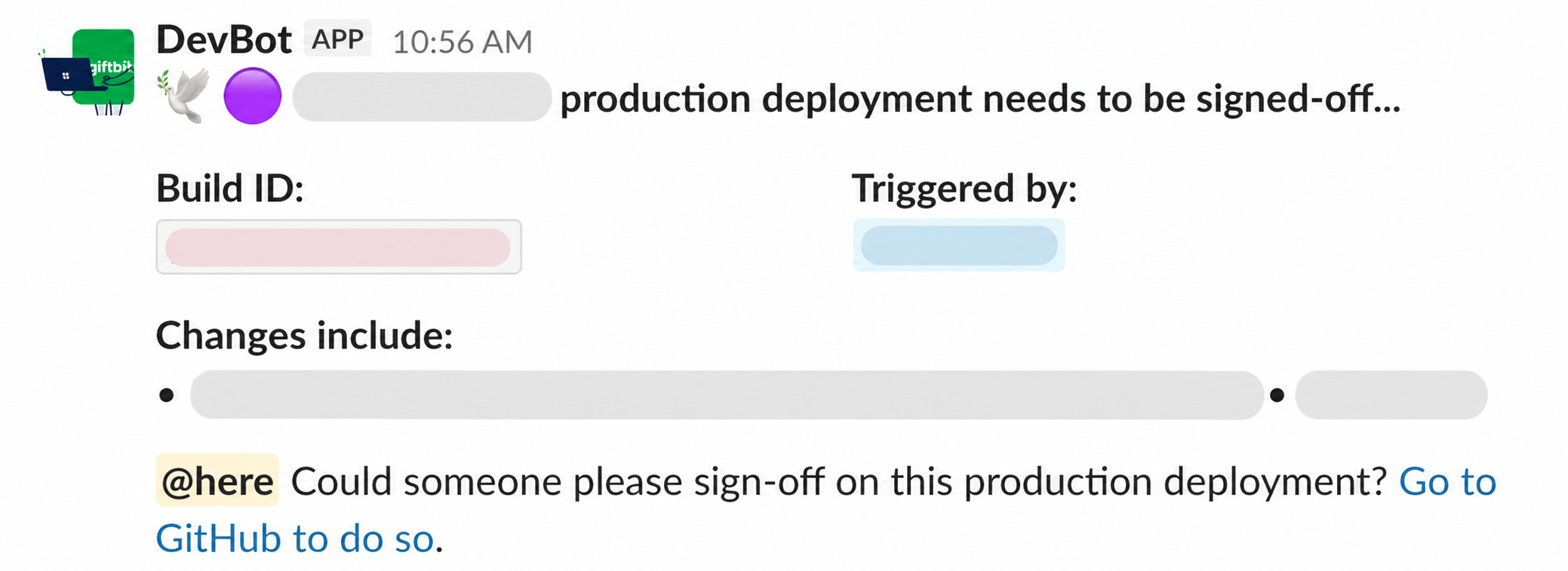
For the production gate the pipeline posts in our release channel with an @here asking for sign-off, then deletes that message once it's done. The third build was missing this at first. I caught it in an audit (more on that below) before the automation went live, but a release would have just sat at the production gate with nobody told.
Piece 5: Production
Production and then the sandbox environment run as sequential steps. These replaced the old per-environment inputs, so the pipeline just assumes it deploys everywhere, in order.
One tip I have is to be careful with plain needs. By default a job only runs if every job it needs succeeded, so if any of them fails or gets skipped, your job silently skips too. That's fine for the deploy itself, but not for something like the sign-off message, which also depends on a job that's only nice to have (the release notes). For those I use !cancelled() plus explicit checks on the jobs that actually matter:
  deploy-signoff-messaging:
    needs: [ci-tests, slack-get-ids, stage-validate, release-notes]
    # !cancelled() so a release notes failure can't silently skip this message,
    # while a cancelled run still stops it
    if: >-
      ${{ !cancelled() &&
      needs.stage-validate.result == 'success' &&
      needs.ci-tests.result == 'success' &&
      needs.slack-get-ids.result == 'success' }}
Piece 6: Release notes
I want the person signing off on production to actually see what's shipping. For that I lean on GitHub Releases, which can generate release notes for you. It builds a "What's Changed" list of every PR merged since the last release, with the author and a link to each one.
The nice part is you don't have to create a release to get those notes. There's an API endpoint, generate-notes, that just returns the markdown GitHub would use, and creates nothing. So I call it right at the top of the pipeline:
TAG="${RELEASE_NAME}-${GITHUB_SHA:0:7}"

if ! BODY="$(gh api --method POST "repos/${GITHUB_REPOSITORY}/releases/generate-notes" \
    -f tag_name="$TAG" \
    -f target_commitish="$GITHUB_SHA" \
    --jq .body)"; then
  echo "::warning::Could not generate release notes"
  BODY=""
fi
tag_name is the tag this release will get, and it doesn't need to exist yet. GitHub works out the previous tag on its own (the most recent published release), so you get exactly the PRs between the last release and this commit. The job needs contents: write permission for this, even though nothing gets written.
Then those same notes get reused everywhere. They go into the production sign-off message in Slack, so the reviewer can see what they're approving. Slack doesn't speak GitHub markdown though, so there's a little sed pass to convert it to Slack's mrkdwn format:
SLACK="$(printf '%s' "$BODY" \
  | sed -E '/Full Changelog/d' \
  | sed -E 's# in https://github\.com/[^[:space:]]+/pull/([0-9]+)# (\#\1)#g' \
  | sed -E 's/^#{1,6}[[:space:]]+(.*)$/*\1*/' \
  | sed -E 's/\*\*([^*]+)\*\*/*\1*/g' \
  | sed -E 's/\[([^]]*)\]\(([^)]*)\)/<\2|\1>/g')"
Headings and bold both become *single asterisks*, markdown links become <url|text>, and full PR URLs shrink down to (#123) so the message stays readable. One gotcha: a Slack section block maxes out at 3000 characters, so a big release needs to be truncated with a "see the GitHub Release for the full notes" link.
Finally, once production is actually out, the pipeline publishes the real GitHub Release using the notes it already computed:
gh release create "$TAG" \
  --target "$GITHUB_SHA" \
  --title "Release $TAG" \
  --notes-file release-notes.md
--target is the exact commit SHA rather than a branch name, so the tag can't drift. And because the notes were generated once at the top of the pipeline instead of being regenerated here, what the reviewer saw in Slack at staging is exactly what the release ends up recording.
The same generate-notes endpoint also powers a little preview comment on each PR, so you can see what the release notes will look like before you even merge.
Piece 7: Slack messaging
This was the hardest part to get right.
The first build had pretty rich messages for each stage (build, staging, deploy). I later had to make them visually distinct from the frontend's existing deploy messages, since both were posting to the same channels.
The second build is where it got hard. To DM the right person I needed to map a GitHub actor to a Slack user, which ended up as a shared ID lookup action. It's nothing fancy. A repo variable holds a JSON map of GitHub usernames to Slack user IDs, and the action looks the actor up with jq:
SLACK_USER_ID=$(echo "$SLACK_USER_IDS" | jq -r --arg actor "$ACTOR" '.[$actor] // empty')There's other examples online of using a dynamic lookup in Slack using the email from GitHub, but we don't use the same email addresses in GitHub and Slack, so that wouldn't work. The simplest solution was a static map that we need to update whenever the team composition changes, which is rarely.
If there's no match it falls back to the release channel, so the message still lands somewhere a human will see it.
Then the merge queue threw in a wrinkle. The queue merges as a bot, so github.actor on the push to main is the bot, and you lose who actually triggered the deploy. I had to implement actor association on merge queue pushes to get that person back:
# Prefer the GitHub user on the commit itself. Squash and rebase merges
# keep the PR author as the commit author.
ACTOR="$(gh api "repos/${REPO}/commits/${SHA}" \
  --jq 'select(.author.type != "Bot") | .author.login // empty')" || ACTOR=""

# Otherwise fall back to the author of the PR that introduced the commit
if [ -z "$ACTOR" ]; then
  ACTOR="$(gh api "repos/${REPO}/commits/${SHA}/pulls" \
    --jq '.[0].user.login // empty')" || ACTOR=""
fi
The first lookup covers most cases. The second one catches commits whose author email isn't linked to a GitHub account, like a merge commit made by the queue itself.
I also started routing failures by stage. A production failure goes to the release channel, and a failure at any earlier stage DMs the actor:
# A failed production deploy is everyone's problem, anything earlier DMs the actor
if [ "$DEPLOY_RESULT" = "failure" ]; then
  CHANNEL="$RELEASE_CHANNEL_ID"
  SUMMARY="🔴 Production deployment has failed."
elif [ "$STAGE_RESULT" = "failure" ]; then
  CHANNEL="$ACTOR_SLACK_ID"
  SUMMARY="🔴 Staging deployment has failed."
else
  CHANNEL="$ACTOR_SLACK_ID"
  SUMMARY="🔴 Deployment pipeline has failed."
fi
It had its share of bugs too. A "deployment started" message was firing before production sign-off had even happened. And a staging message was going out before the Slack ID lookup had finished.
The third build started out with only the messages inside each individual deploy. So a failure in the lock check or the build metadata step just went silent. Adding pipeline-level success and failure messages fixed that. These are jobs at the end of the workflow that need every other job, and look at all their results at once:
  cd-failure-messaging:
    needs: [check-lock, ci-tests, slack-get-ids, release-notes, stage, stage-validate, deploy, release-lock]
    if: always() && contains(needs.*.result, 'failure')

  cd-success-messaging:
    needs: [check-lock, ci-tests, slack-get-ids, release-notes, stage, stage-validate, deploy, release-lock]
    # A skipped deploy (from the SKIP-RELEASE label) stays quiet
    if: |
      always() &&
      needs.deploy.result == 'success' &&
      !contains(needs.*.result, 'failure') &&
      !contains(needs.*.result, 'cancelled')
needs.*.result gives you an array of every dependency's result, and contains() checks it. So if anything anywhere in the pipeline fails, the failure message goes out.
Messaging is the hard part I underestimated three times running. 🤷🏻♂️
Piece 8: Shared actions
I didn't extract anything during the first build, mostly because I didn't know what would be shared yet. The second build made it pretty obvious.
I pulled the lock, AWS credential config, Slack ID lookup, and PR label checks into a central actions repo. That deleted roughly 1000 lines of duplicated YAML across our repos.
The third build taught me a versioning lesson. Pin your internal actions to a commit SHA, and don't leave the workflows you call on @main. It's easy to pin the top-level workflow and forget about the ones it calls. Which is exactly what I did.
# Floats with whatever is on main in the shared repo
uses: my-org/shared-actions/deploy-mutex@main

# Pinned. The comment is just for humans (and Dependabot)
uses: my-org/shared-actions/deploy-mutex@<full-commit-sha> # v1.2.0
What the third build taught me
By the third build I had two working pipelines to compare against, so the work basically turned into a diff: list everything both peers do that this one doesn't. That audit turned up the missing sign-off messaging, release notes, skip label, pipeline-level failure messages, and some incomplete action pinning.
I shipped it as a stack of small PRs, each one mergeable and safe on its own:
- Lock workflow, plus support for it in the shared action
- A placeholder CD workflow
- CI
- Lock check and release
- Build
- Staging deploy
- The
staging-validategate - Production deploy
The new workflow ran alongside the old deploy wrapper during rollout, so the chat bot kept working the whole time.
All in it was maybe a week of focused work, spread over a month alongside other things. That was only possible because the pieces were already shared.
Rollout
The rollout was the same all three times. Run it workflow_dispatch-only first, do some test runs with the team, and then flip the push-to-main trigger. That trigger is always the last switch.
For the first build I demoed the pipeline to the devs before turning on the automation, and updated our deploy docs. For the second, a teammate did a test run and the only step that failed was because GitHub itself was down. Can't really plan for that one.
The third build ran dispatch-only while I closed the gaps from the audit. Then I flipped the trigger and full automation rolled out in September 2026. All three projects now deploy on merge.
Conclusion
The overall shape settled pretty fast, but the pieces inside it kept changing with every build.
If I did this again I'd still wait until the second build to extract shared code, since that's when I actually knew what was shared. Small mergeable PRs worked way better than one big pipeline PR would have. The lock and the messaging are what got people to trust the automation.
I'd love to add more automated testing on deployments to validate they're working correctly. Thats a project for the near future. The human approval steps are still valuable with or without that testing. They still give you a nice audit trail of responsibility.
So there you go. Three pipelines, and deploys went from once or twice a month to as many as 5 a day. 😎